灰泥屋 Haidoroya

わおんMusic Transcriber

See the notes inside your recordings.

わおん (WaoN) turns a recording into editable notes. The waveform, the spectrogram, and the notes it detected sit together on one synchronized timeline — so you can see what you are hearing, correct it by hand, and export it as MIDI or MusicXML. For iPhone, iPad, and Mac.

Download on the App Store

Free to try — analyze, edit, and export the first 30 seconds of any recording. A one-time Full Unlock (US$34.99) removes the length limit entirely and covers iPhone, iPad, and Mac. No subscription, no account.

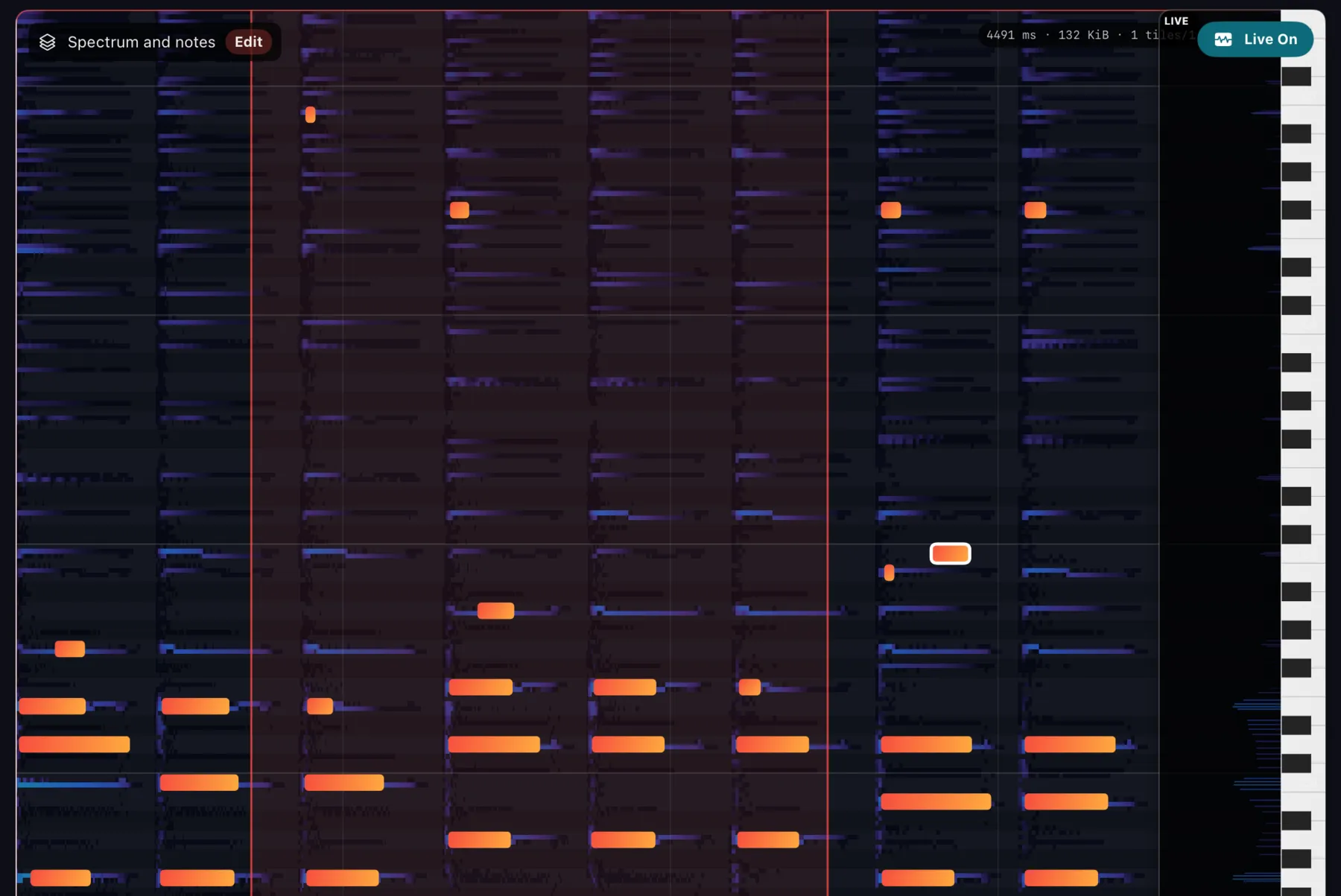
A spectrogram in dark blue and purple with detected notes drawn over it as orange bars, aligned to a piano keyboard along the right edge.

Detected notes, drawn on the spectrogram they came from.

WHAT IT DOES

わおん corrects each frequency by phase difference before picking notes out of the spectrum, so pitch is resolved more finely than the FFT’s own bin spacing would allow.

Analyze

  • Open an audio file, or record one straight into わおん
  • Waveform, spectrogram, and detected notes on one timeline
  • Seek and zoom through the recording
  • Change playback speed and pitch without altering the source audio — from −2× (reverse) through 0× (held) to +2×
  • Loop a difficult passage and study it repeatedly
  • Switch between spectrum, overlay, and notes views

Edit

  • Select and audition individual notes
  • Drag notes in time or in pitch
  • Add notes the analysis missed, delete the ones it invented
  • Fine-tune pitch, start, end, and velocity
  • Undo and redo

Export

  • Export as MIDI or MusicXML
  • Key and tempo estimated automatically before export
  • Adjust key and tempo by hand when the estimate is wrong
  • Save the file or send it to another music app

ON SCREEN

Automatic transcription is a starting point, not an answer. わおん is built so that the starting point is visible and the correction is quick.

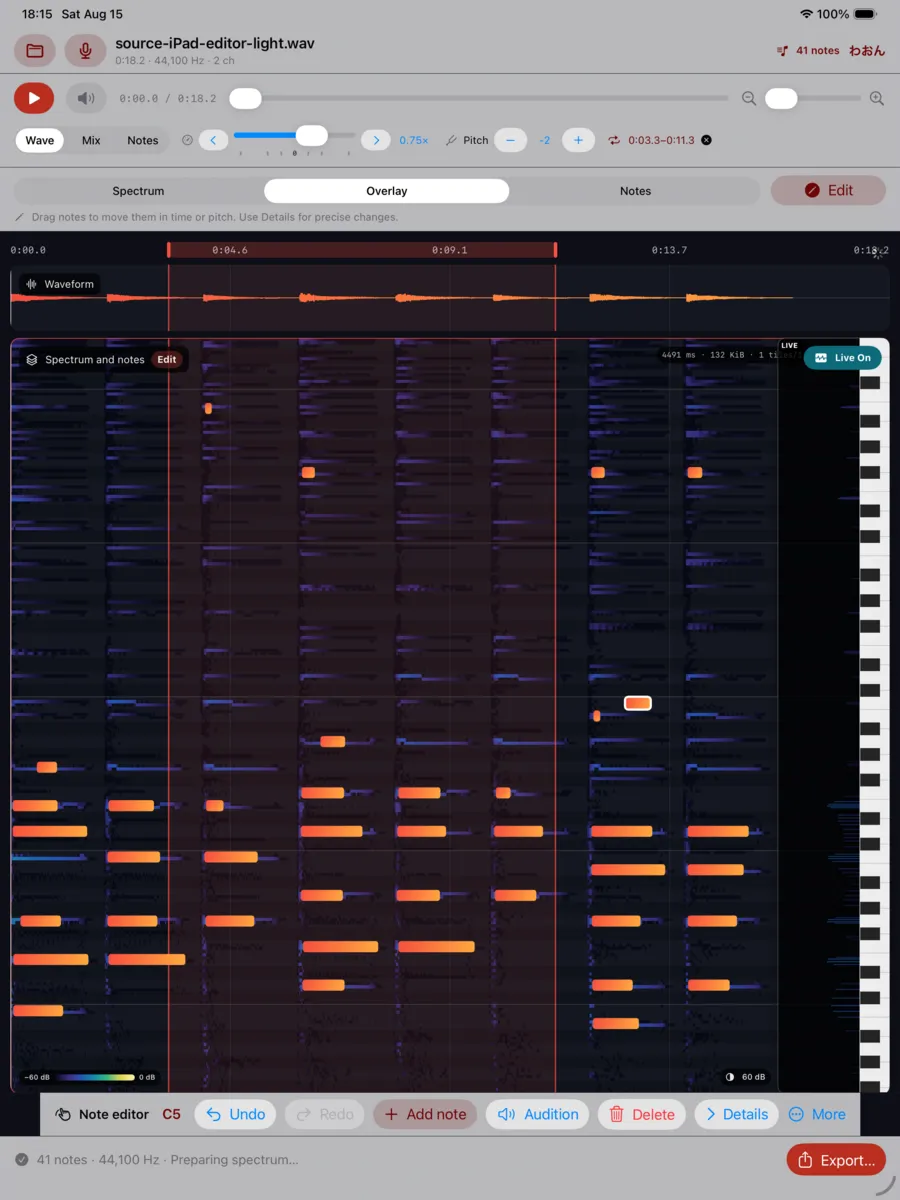
The main workspace on iPad: transport controls, waveform, and a spectrogram with orange notes overlaid.
The workspace. Waveform above, spectrogram and notes below, one timeline through both.
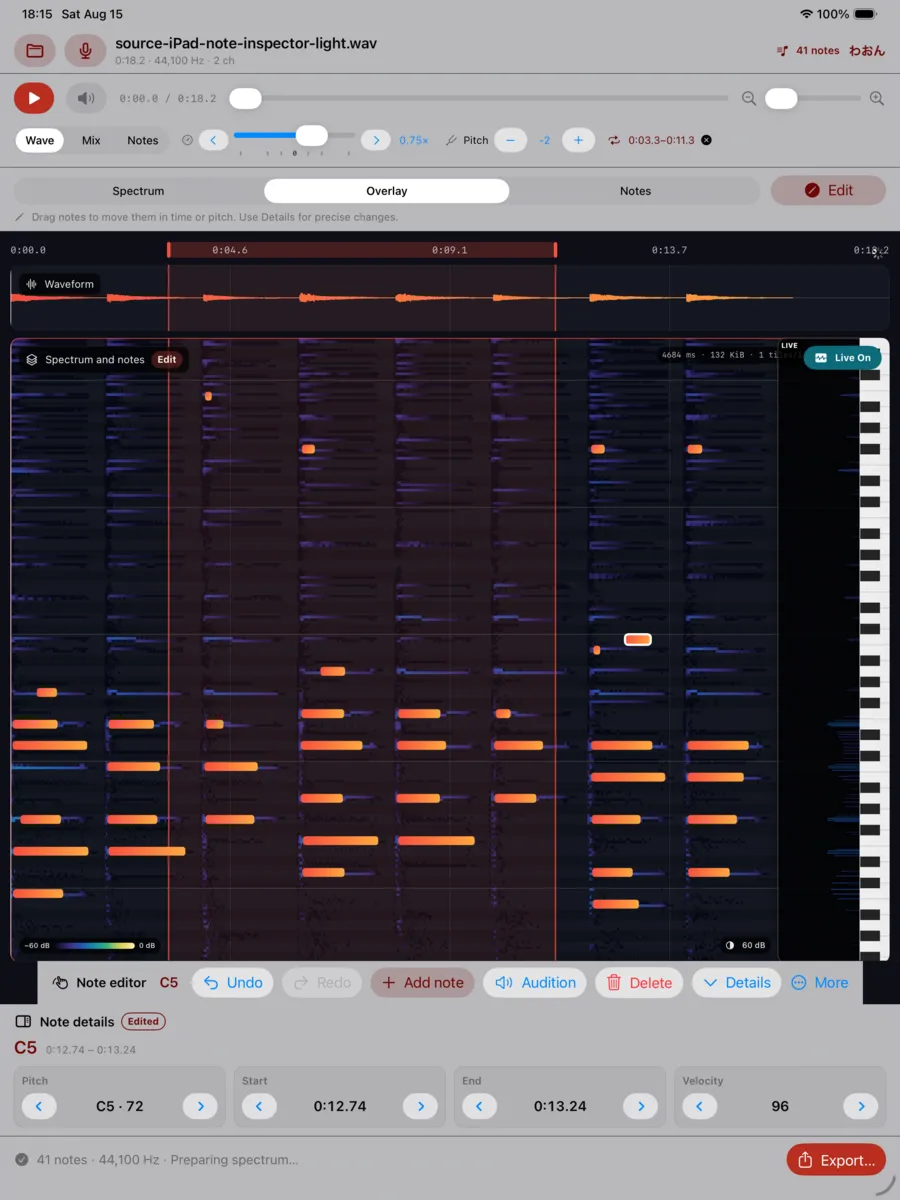
The note inspector on iPad, showing numeric fields for a selected note.
The note inspector. Pitch, start, end, and velocity, as numbers, when dragging is not precise enough.
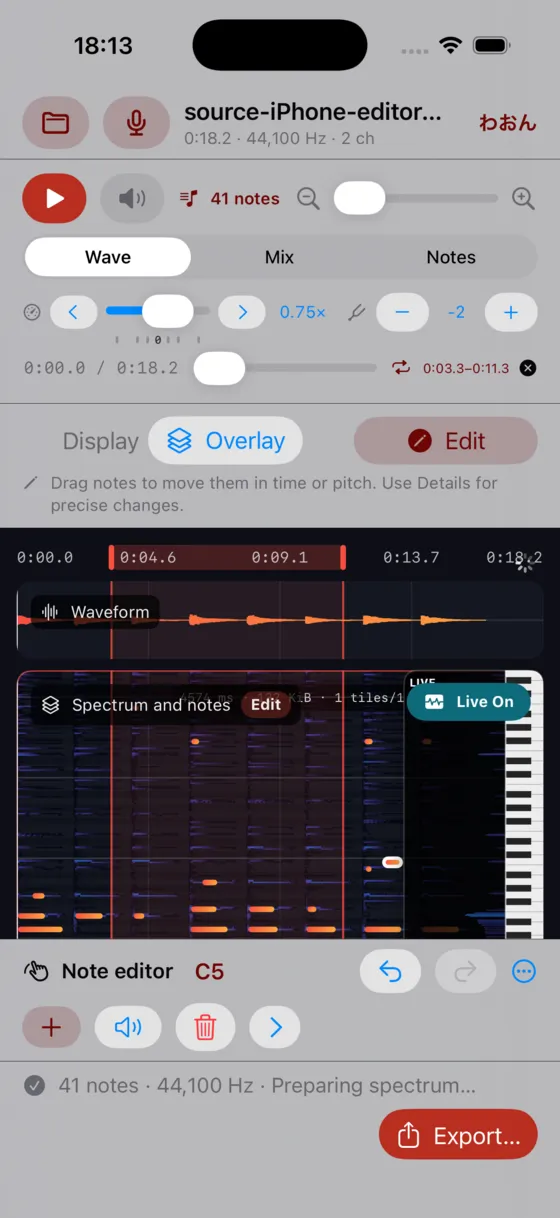
The same workspace on iPhone, with the spectrogram and notes filling the screen.
The same workspace on iPhone. One purchase covers all three platforms.

STOP, AND IT KEEPS RINGING

Playback speed runs continuously from −2× to +2× on one control. Negative is reverse. And at 0× the sound does not stop. わおん goes on synthesising the spectral frame under the playhead, so the chord keeps sounding while you pick it apart — no racing the clock to hear an inner voice again.

Apple’s own audio units cannot hold at rate zero. The WaoN phase vocoder — pv, from the open-source project — can, and reverse, pause, and seeking all follow from it, so they run into one another naturally.

AS LONG AS THE RECORDING IS

The free version works on the first 30 seconds. After Full Unlock there is no preset duration limit at all — わおん processes any finite file it can open, bounded only by the free storage (not the memory) your device can give it. A full hour of audio is an ordinary case here, not an edge case.

The workspace is built for that. The timeline is addressed in source frames rather than in seconds, and わおん reads from the file only the stretch it is working on, computing waveform, spectrum, and analysis over ranges as you move through it.

ONE SESSION AT A TIME

わおん is session-oriented. You work on one recording at a time, and when the session ends, it ends — open something else and the app moves with you. わおん does not take custody of your work. You do. There is no library to manage and no project format to migrate. Keep what matters by exporting it — MIDI, MusicXML, or the audio you recorded here — saved wherever you want it. What carries over between sessions is only reproducible: spectrogram tiles and detected notes in the system cache, which you can throw away at any time and lose nothing but the time to compute them again.

No server, so no account. No account, so no password. Nothing to sign up for, and nothing to forget.

Analysis runs on your device. No recording is ever uploaded, there is no advertising, and there is nothing standing between you and the recording you opened.

IT BEGAN IN 1996

On 3 December 1996 I started a small program called wav2mid. It read a sound file and wrote out MIDI notes. Two days later the first generation was frozen, and over the years that followed it grew into WaoN — a wave-to-notes transcriber, released under the GPL, packaged by Linux distributions, and used by people I never met. The last release went out in 2015.

WaoN is the inverse of a MIDI player. Instead of turning notes into sound, it turns sound into notes.

わおん is that work, rebuilt for the devices people actually carry. What is new is not the idea — it is that you can now see it. The spectrogram and the notes drawn from it, on the same timeline, at the same moment, where you can take hold of a note and move it.

The open-source WaoN is still free and still on GitHub, as it has always been: github.com/kichiki/WaoN.

PRICE

DownloadFree
Free versionAnalyze, edit, and export the first 30 seconds of any recording. Every feature is available within those 30 seconds — nothing is hidden behind the purchase except length.
Full UnlockA one-time in-app purchase, US$34.99. Local pricing varies by App Store region. There is no preset duration limit after unlocking.
DevicesOne purchase covers iPhone, iPad, and Mac through Universal Purchase.
SubscriptionNone.

Nothing here recurs: no subscription, no renewal, no account to keep alive. You buy it once and it is yours.

REQUIREMENTS

iPhoneiOS 16.0 or later
iPadiPadOS 16.0 or later
MacmacOS 14.0 or later
Size2.8 MB
InterfaceEnglish
Availability135 countries. Not currently available in the European Union.

THE LONG ANSWER

If you want to know why the spectrogram looks the way it does, there is a book about it.

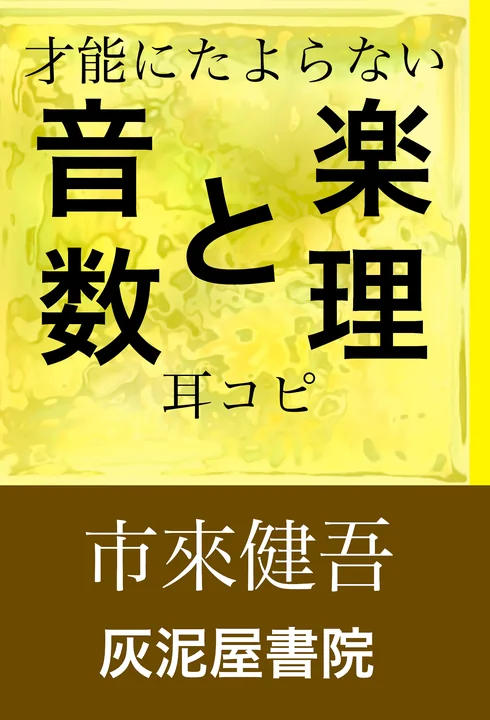
Cover of Listen Like a Programmer: From Wave to Note with Mathematics and Code, by Kengo Ichiki.

Listen Like a Programmer
From Wave to Note with Mathematics and Code

It starts with sound and pitch, works through Fourier analysis, the discrete Fourier transform, power spectra, window functions, and the phase vocoder — and then shows how the WaoN program uses them to turn audio into MIDI. Written for the curious amateur, not for the specialist.

Paperback/Kindle

Japanese original: 音楽と数理 才能にたよらない耳コピ

QUESTIONS

What kind of music is it for?
Music with harmony in it. わおん extracts pitch, so when several notes sound together it tries to find each of them — piano and guitar chords, inner voices in an ensemble. Unpitched percussion is out of scope. Instruments differ in how their overtones fall, and わおん is tuned to cope with that, though never perfectly. That is why the notes are editable.
Is this a subscription?
No. Full Unlock is a single purchase, and it does not expire.
Do I have to buy it again for each device?
No. Universal Purchase means one payment covers iPhone, iPad, and Mac on the same Apple Account.
What can I do before paying?
Everything, on the first 30 seconds of any recording — analyze it, edit the notes, and export the result. The purchase removes the length limit; it does not unlock features.
Is my audio sent to a server?
No. Analysis runs on your device, and no account is required. Nothing is uploaded, and the app keeps no library of your work — what you want to keep, you export.
How long a recording can it handle?
After Full Unlock there is no preset limit — the only bound is free space on your device. わおん reads from the file only the stretch it is working on, so an hour-long recording is an ordinary case.
Where do my edits live?
In the session, and in a system cache of reproducible analysis — spectrogram tiles and detected notes. Export what you want to keep as MIDI or MusicXML; clearing the cache costs you nothing but recomputation time.
What audio files can it open?
Whatever your device can already play — MP3, AAC/M4A, WAV, AIFF and the rest. You can also record straight into わおん with the microphone.
What can I export?
MIDI and MusicXML, with key and tempo estimated automatically and adjustable by hand.
Is this the same as the open-source WaoN?
Same author, same lineage. I hold the copyright to the shared analysis core — so the WaoN project (the waon transcriber, the pv phase vocoder, and the gwaon GTK interface) stays GPL and free on GitHub, while the same core is licensed separately for this app. The app links no third-party open-source library: on Apple platforms the FFT comes from Apple’s own Accelerate framework.
Is it available in Europe?
Not at present. It is available in 135 other countries, including the United Kingdom and Switzerland.

TRY IT ON A RECORDING YOU KNOW

The first 30 seconds are free, and they are the honest test: open something you have already worked out by ear, and see how much of it わおん finds.

Download on the App Store